Opening Ceremony

Bhim Higher Secondary School Suntopar, Dolakha

Opening Ceremony

Bhim Higher Secondary School Suntopar, Dolakha

JCT Students (First Batch(2069-2070))

Bhim Higher Secondary School Suntopar, Dolakha

Opening Ceremony

Bhim Higher Secondary School Suntopar, Dolakha

Opening Ceremony

Bhim Higher Secondary School Suntopar, Dolakha

Showing posts with label Pendrive. Show all posts

Friday, February 21, 2014

Recover the Data of formatted pendrive

Recover the Data from formatted Pendrive
-----------------------------------------------
Some Common PC Errors with their Solutions:
http://bhssjct.blogspot.com/2013/11/some-common-pc-errors-solutions.html

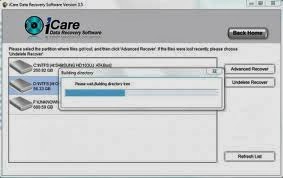
iCare Data Recovery Free Edition
==>
Free recovery software that can recover 2GB data. It can perform basic and advanced data resuce to help you restore data deleted, formattedor lost due to errors such as drive/system crash, virus attack etc. It can recover documents, emails, pictures, videos and audio files from almost any storage media including PC hard drive, cell phone, digital camera, removable media etc.
As a powerful and complete 2GB data recovery freeware, it is full compatiable with Windows XP/Vista/7. iCare Data Recovery Free is able to help you when other recovery freeware failed.
Freeware for home users only and it is for your own use.

Download Link: http://download.icare-recovery.com/icarefree.exe
Maximum capacity of RAM in different OS:
http://bhssjct.blogspot.com/2013/12/maximum-capacity-of-ram-in-different-os.html

Wednesday, January 22, 2014

Remove Shortcut virus from USB Pendrive, PC, Hard disk, Memory cards with & Without software


What is Shortcut Virus?
       I have seen this problem in PC having antivirus too, when your Pen drive, PC, Hard Disk, Memory cards or mobile phone got infected by some anonymous malware, they change your files into shortcuts with the original folder icons.


How to remove shortcut virus in pen drive, Pc and other devices?

 Just follow the below given steps to remove, delete, wipe out or whatever the shortcut virus from your
 pen drive, memory cards or even mobile phone and recover back your files. 


  Download the below given application and Remove the Shortcut virus in a minute, Created by sYaM92x

Download: http://uppit.com/ljs2zynei1af/Shortcut_Virus_Remover_v3.1.rar


If the application fails, Follow the below Steps:
·                     Go to Start -> Run -> cmd.
·                     Go to your pen drive, memory cards or even mobile phone directory.
·                     Type this command: del *.lnk and press Enter.
·                     Type attrib -h -r -s /s /d e:\*.*
·                     Replace e with your drive letter
·                     And then press a gentle Enter.


Monday, April 29, 2013

Use Pen drive as Ram

Use Pen Drive As Ram


If Your Computer is being slow Due to Memory then you can use your pendrive as ram.
Look It here: http://bhssjct.blogspot.com


it can be used by those who have Windows XP and also for Windows 2000 (Mostly)
All u need is a pen drive of minimum 1GB. Now, I will tell you the steps

1. Insert the Pen Drive (1GB at least) in the USB port
try to prefer 4GB
।
2. Let the PC do what it wants to do to detect it..

3. After it finished his work, you have to act smart,

" Here goes the real thing "

4. Right Click on My Computer -> Properties

5. Advanced -> Performance Settings

6. Advanced -> Change

7. Select the Pen Drive

8. Click on Custom Size

" Check the value of space available "

9. Enter the same in the Initial and the Max columns

" You just used the space of the
Pen Drive as a Virtual Memory "

Restart........

Now check the general start up time and also speed of your system .. so u can have a high speed system in low cost.