Opening Ceremony

Bhim Higher Secondary School Suntopar, Dolakha

Opening Ceremony

Bhim Higher Secondary School Suntopar, Dolakha

JCT Students (First Batch(2069-2070))

Bhim Higher Secondary School Suntopar, Dolakha

Opening Ceremony

Bhim Higher Secondary School Suntopar, Dolakha

Opening Ceremony

Bhim Higher Secondary School Suntopar, Dolakha

Showing posts with label Ram. Show all posts

Saturday, December 14, 2013

RDRAM (Rambus Dynamic Random Access Memory)


Rambus Dynamic Random Access Memory (RDRAM) is a memory subsystem that promises to transfer up to 1.6 billion bytes per second. The subsystem consists of the random access memory, the RAM controller, and the bus (path) connecting RAM to the microprocessor and devices in the computer that use it. Direct Rambus (DRDRAM), a technology developed and licensed by the Rambus Corporation, will be used with microprocessors beginning in 1999.
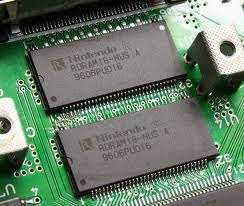

 High-speed RAM is expected to accelerate the growth of visually intensive interfaces such as 3-D, interactive games, and streaming multimedia. Rambus is intended to replace the current main memory technology of dynamic random access memory (DRAM). Much faster data transfer rates from attached devices such as videocams using FireWire and the Accelerated Graphics Port (AGP) make it important to reduce the bottleneck in getting data into the computer, staging it in RAM, and moving it throught the microprocessor and to the display or other output devices.

Direct Rambus (DRDRAM) provides a two-byte (16 bit) bus rather than DRAM's 8-bit bus. At a RAM speed of 800 megahertz (800 million cycles per second), the peak data transfer rate is 1.6 billion bytes per second. Direct Rambus uses pipelining to move data from RAM tocache memory levels that are closer to the microprocessor or display. Up to eight operations may be underway at the same time. Rambus is designed to fit into existing motherboardstandards. The components that are inserted into motherboard connections are called Rambus in-line memory modules (RIMMs). They can replace conventional dual in-line memory modules.
A proposed alternative to DRDRAM is SyncLink DRAM (SDRAM).

Maximum Capacity of RAM in Different OS


For More Tips, Tweaks and Tricks:
Click Here: http://www.facebook.com/morganglboal
Click Hree: http://bhssjct.blogspot.com

OS (Operating System)                                                    Amount of RAM Supported
------------------------- -----------------------------
Windows 8 64 bit Enterprise, Professional                                       512 GB
Windows 8 64 bit                                                                            128 GB
Windows 8 32 bit                                                                             4 GB

Windows 7 64 bit Ultimate, Enterprise & Professional                       192 GB
Windows 7 64 bit Home Premium                                                     16 GB
Windows 7 64 bit Home Basic                                                           8 GB
Windows 7 32 bit (all editions except Starter)                                     4 GB
Windows 7 32 bit Starter                                                                   2 GB

Windows Vista 64 bit Ultimate, Enterprise & Business                     128 GB
Windows Vista 64 bit Home Premium                                                 16 GB
Windows Vista 64 bit Home Basic                                                      8 GB
Windows Vista 32 bit (all editions except Starter)                                4 GB
Windows 7 32 bit Starter                                                                    1 GB

Windows XP 64 bit                                                                             128 GB
Windows XP 32 bit                                                                             4 GB


Mac OS X 64 bit                                                                                96 GB

Linux 64 bit                                                                                        1 TB
Linux 32 bit                                                                                         4 GB
Linux 32 bit (with PAE)                                                                       64 GB


Taking a closer look at the table above, you will notice that 32 bit operating systems can access just 4 GB of RAM

at most.

And there's more bad news: This 4 GB memory limit is shared between RAM and other devices (e.g. video, audio and

network memory) so this further reduces the amount of available RAM to 3 - 3.5 GB in most cases.

Note: If you intend to have 4 GB of RAM or more, it's highly recommended that you install a 64 bit operating

system (unless you are stuck with primitive device drivers or programs that only work in 32 bit).

For More Tips, Tweaks and Tricks:
Click Here: http://www.facebook.com/morganglboal
Click Hree: http://bhssjct.blogspot.com

Monday, April 29, 2013

Use Pen drive as Ram

Use Pen Drive As Ram


If Your Computer is being slow Due to Memory then you can use your pendrive as ram.
Look It here: http://bhssjct.blogspot.com


it can be used by those who have Windows XP and also for Windows 2000 (Mostly)
All u need is a pen drive of minimum 1GB. Now, I will tell you the steps

1. Insert the Pen Drive (1GB at least) in the USB port
try to prefer 4GB
।
2. Let the PC do what it wants to do to detect it..

3. After it finished his work, you have to act smart,

" Here goes the real thing "

4. Right Click on My Computer -> Properties

5. Advanced -> Performance Settings

6. Advanced -> Change

7. Select the Pen Drive

8. Click on Custom Size

" Check the value of space available "

9. Enter the same in the Initial and the Max columns

" You just used the space of the
Pen Drive as a Virtual Memory "

Restart........

Now check the general start up time and also speed of your system .. so u can have a high speed system in low cost.